Adding Supernote PDF Annotation Support to Sioyek
One of the core FOSS principles is the freedom to study how software works and adapt it to your needs. In practice, though, diving into a large, unfamiliar codebase in a domain you’re not an expert in, using a programming language you’re not necessarily proficient with, is hard.
AI agents make this much easier. They help you understand how a project is structured, point you to the right places in the code, and apply fixes or new features whilst following the project’s existing patterns and style.
At work, I’m reluctant to let AI agents loose because it feels like inheriting legacy code. For personal projects, I don’t care. Without AI, many features and fixes I want would simply never happen.
I now maintain a handful of mini-forks of programmes I care about, with tweaks that suit how I actually use them. I’ve written about one feature I added to Marp. I also use a tweaked version of Sway that I should probably write about. Here’s how I added a feature I’ve been missing for ages to Sioyek, my PDF reader of choice.
The Annotation Sync Problem
I use a combination of Supernote e-ink tablets and Sioyek on my computers to read and annotate academic PDFs. I enjoy jotting down thoughts on Supernote with a pen. Sioyek has also recently improved its free-form annotation features, which I use regularly.
The problem is that my two annotation systems aren’t synchronised. I have sideloaded syncthing on my Supernote, so file synchronisation between devices happens seamlessly. However, Supernote doesn’t embed annotations directly into the PDF file, so Sioyek can’t display them. Instead, Supernote stores annotations in a separate .mark file alongside the PDF and overlays them when viewing on the device.
Supernote does allow manual export of PDFs with annotations baked in, but that adds an extra step to my workflow. Ratta (Supernote’s maker) is aware of this limitation, and there’s an open issue for auto-merging annotations into PDFs.
Originally I thought that’s what I was waiting for. But I’ve since realised I actually prefer storing annotations separately. This aligns better with how Sioyek works anyway. Sioyek stores annotations and highlights in a database and doesn’t modify the PDF directly. Storing Supernote annotations in the PDF would likely break my Sioyek setup because it uses a hash of the PDF’s content as the document key in the database, and modifying the PDF would create database duplicates.
What I actually want is for Sioyek to understand .mark files and overlay the annotations. Sioyek already has support for something similar: it can read .sioyek.drawings files placed alongside PDFs. These files contain a JSON structure that stores drawing data organised by page number, with each drawing defined by coordinates, timestamps, and styling properties.
Adding .mark Support to Sioyek
My ultimate goal was to make Sioyek understand and overlay .mark files. Unfortunately, this is a proprietary format. There’s a thread on /r/Supernote where Ratta mentioned plans to open-source the format, but that thread is now five years old.
Fortunately, the file format isn’t entirely unknown. A Python library called supernote-tool converts .note and .mark files into PNGs. I thought overlaying PNGs on PDFs could be a good intermediate step. I used this library to generate example PNGs from my .mark files, then pointed my AI agent, Claude Opus 4.5, to Sioyek’s .sioyek.drawings mechanism. With these examples, the agent added PNG overlaying support easily. Even if direct .mark support proved difficult, I could run a background task to generate PNGs from .mark files and display those.
I then pointed the agent to supernote-tool and asked it to generate specifications for the .mark file format. The format includes both a compressed layer bitmap (which can be extracted into PNG) and vector path data that isn’t fully decoded yet. Ideally I’d use the vector data, but PNG bitmaps would suffice for now.
I fed this specification sheet into the agent along with sample PDFs and .mark files. After a few iterations to iron out positioning and scaling issues, it successfully extracted the bitmap and overlaid it directly on the PDF. The quality isn’t quite as crisp as what I see on Supernote, but it’s close enough:
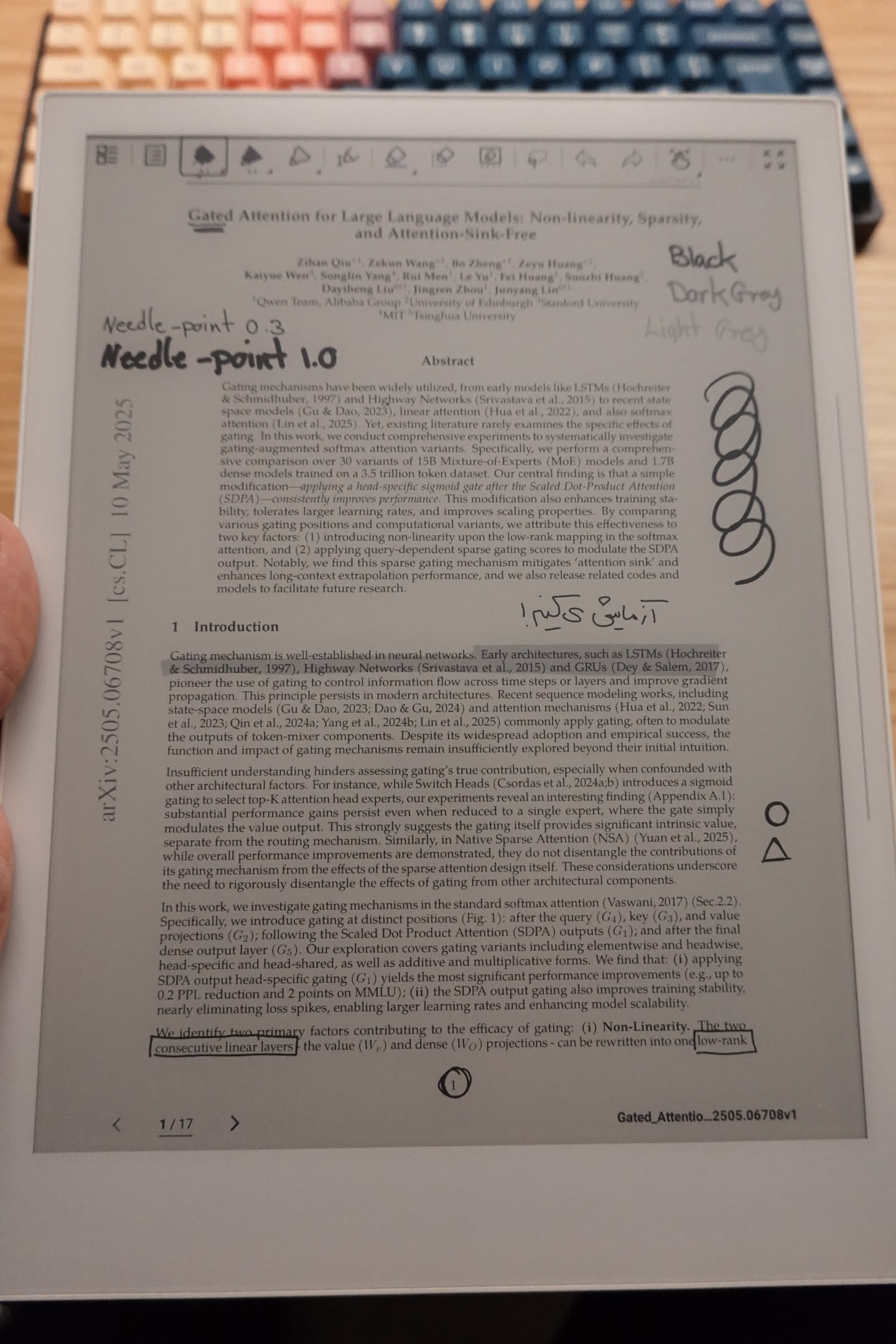
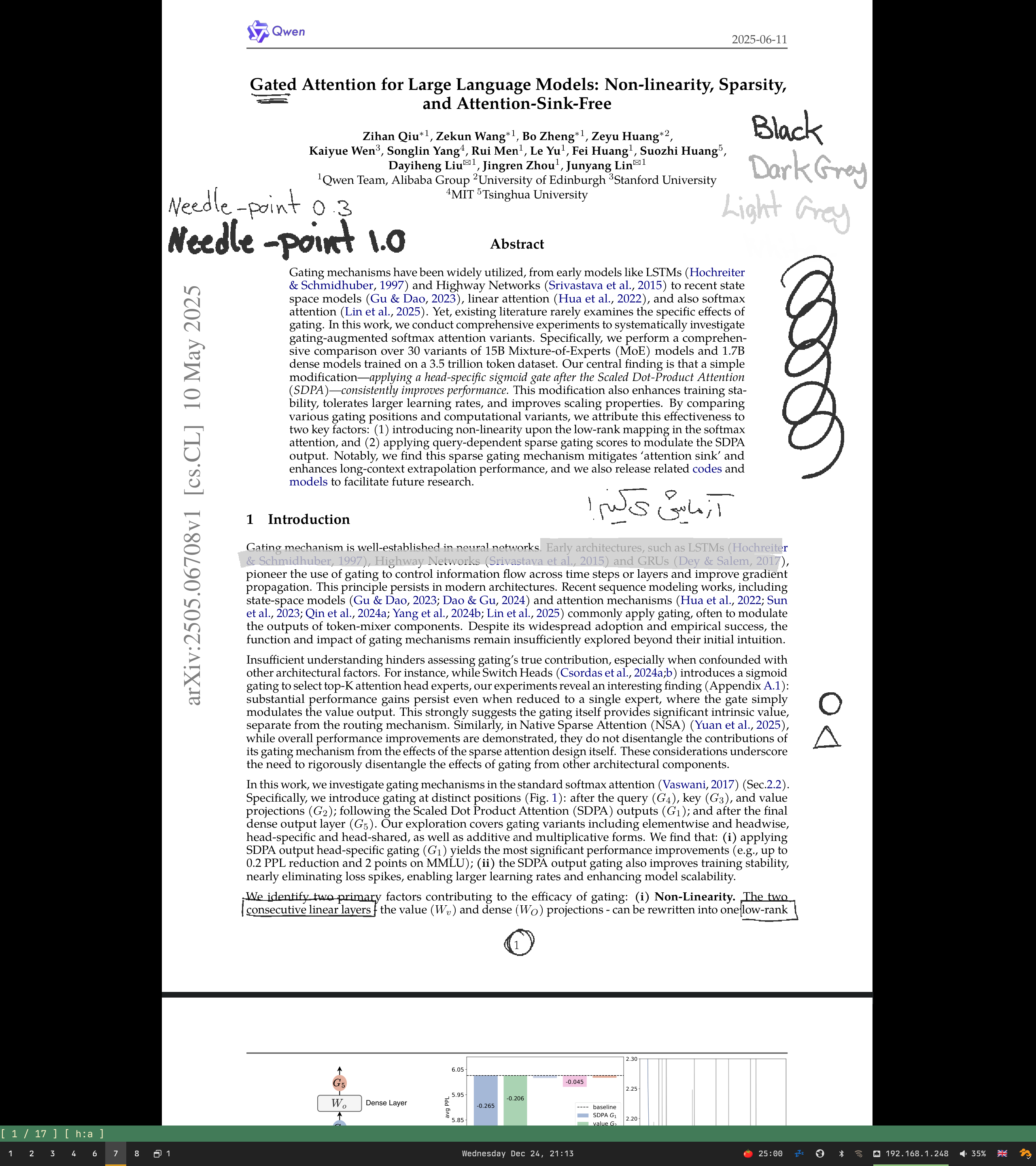
Now I can seamlessly annotate on my Supernote, and thanks to syncthing, the annotations are automatically synced and visible in Sioyek on my computers. It doesn’t work the other way around, but that’s fine for my workflow.
How Can I Get It!?
If you’re on Arch Linux, you can get this build from the AUR package I’ve put together:
yay -S sioyek-supernote
Otherwise, you can download the build artefacts for your OS from this GitHub Action.
Note that I’ve only tested this with Supernote A5X on Arch Linux, and I don’t know if it works on .mark files generated on the newer Manta and Nomad devices. I also haven’t run extensive tests. I had several issues with scaling and positioning of annotations. They seem to work well now with standard A4 and letter page sizes, but I wouldn’t be surprised if positions are off with some other page sizes.
What’s Next?
The ideal solution would be to decode the vector data (embedded in the TOTALPATH field) directly, which would give much better quality than the current PNG-based approach. In the meantime, I’d like to get this merged upstream into Sioyek. The developer is great and has been receptive to new ideas in the few interactions I’ve had with them, so hopefully this could happen soon.