Rendering markdown with LaTeX in the terminal
Even when I’m not using Claude Code, most of my chatting with LLMs happens in the terminal. I use my fork of mods, the (now sunsetted) LLM CLI client from Charm, to which I’ve added an interactive mode and a handful of other niceties for the majority of my day-to-day LLM interactions.
LLMs output markdown constantly, and Charm’s tools have some of the best terminal markdown rendering around, powered by their glamour library. Occasionally I reach for Simon Willison’s llm CLI tool instead, which doesn’t do any markdown rendering. In those cases I can still pipe the output to Charm’s standalone markdown renderer glow, which I have forked as well to add streaming support.
But a lot of my chats involve maths, and that’s something these CLIs do nothing about. In a terminal that means squinting at raw LaTeX like
$$x = \frac{-b \pm \sqrt{b^2 - 4ac}}{2a}$$
and reconstructing the formula in my head.
I wondered whether this could be done better. This week, while working on an unrelated project that relied on some of the fancier graphics features in kitty and Ghostty terminals, it occurred to me the same trick could work for LaTeX in mods or glow. After a bit of trial and error and a lot of help from Claude, I ended up with something pretty decent.
You can see it in action here in mods:
or as a pure markdown renderer with glow:
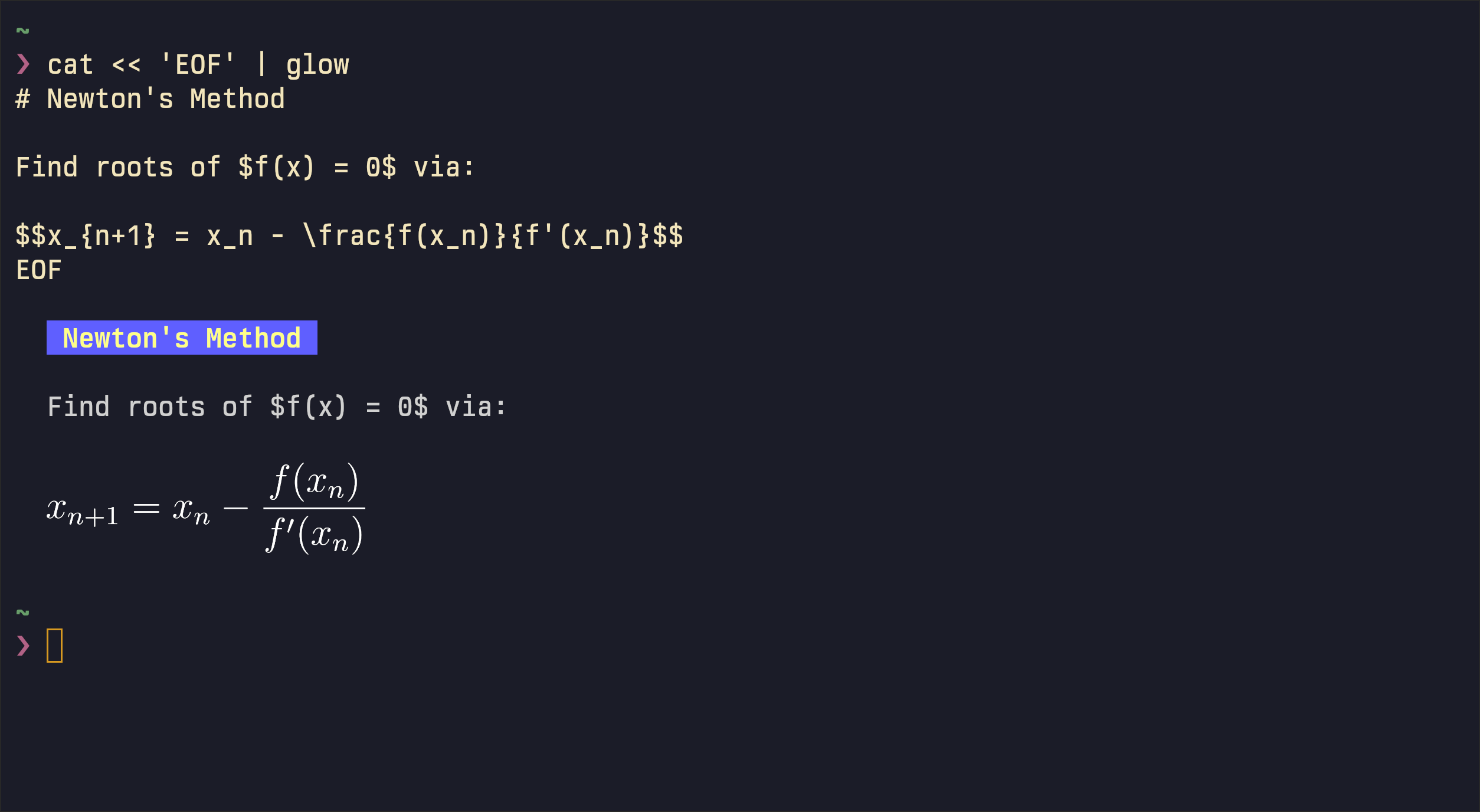
How does it work?
The first piece is turning the LaTeX into an image. I played around with integrating KaTeX or MathJax directly into mods or glow, but ended up just relying on the CodeCogs endpoint, which renders a snippet of LaTeX to a PNG over a plain HTTP request. It’s remote, so it won’t work offline and you’re handing your equations to someone else’s server, but it kept this part to a single GET, and I can swap in a local renderer later if it bothers me enough.
The next piece is getting that image displayed in the terminal in a way that survives the TUI being redrawn constantly. I’ve already written about how kitty’s Unicode placeholders can be used to draw images in the terminal that behave like text: you transmit the image as an invisible “virtual placement”, then display it by writing out a grid of placeholder cells that encode the row, column and image id. That is useful here because the TUI redraws on every keystroke, so an image painted at the cursor would be trampled on the very next frame, while one made of ordinary text cells flows with the text.
The last piece is doing all this while the response is still streaming, not only once it has finished. A round-trip to CodeCogs could be slow, so each equation renders on a background goroutine: when a $$…$$ block closes I fire off the request and leave its spot blank, and the image drops in a beat later once the PNG arrives. It’s cached from then on.
Limitations
There are two main limitations.
The first is that this only works in kitty and Ghostty, since it leans on their Unicode placeholder support; in any other terminal the LaTeX stays as raw text.
The second is that only block equations get this treatment. Inline maths (the $x$ scattered mid-sentence) turned out fiddly: a terminal line can’t grow taller to fit a fraction, and shrinking everything to a single cell looked weird. Getting the baseline right was its own headache, since an inline image wants to sit on the text baseline rather than the bottom of the cell, and lining that up cleanly was harder than I expected. I had something almost good enough, so I might still enable it behind a flag at some point.
How to get it
glow a simpler place to start. I originally forked it to add support for streaming. Install my fork from:
go install github.com/mil-ad/glow/v2@with-streaming
And if you’re using mods you can get my fork from:
go install github.com/mil-ad/mods
LaTeX rendering is on by default and can be toggled with the --render-latex false flag.